Container with LS-BUS enabled FMUs
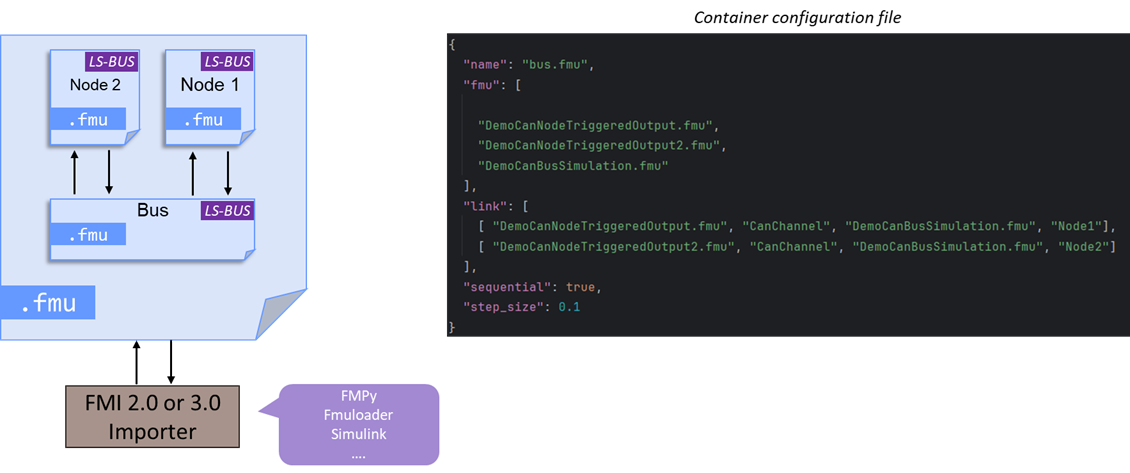
What is supported
fmucontainer supports FMI-LS-BUS up to 1.3.0-rc.1, a release candidate: it may still change until the final 1.3.0.
| Topic | Support |
|---|---|
| Buses | CAN, LIN, FlexRay and Ethernet: the bus operations are binaries that the container transports without reading them |
| Topologies | Nodes connected to a Bus Simulation FMU, or directly to each other |
| Container | It holds the whole network. It exposes no clock: a container cannot be connected as a node to a bus outside of it |
| Abstractions | Network Abstraction (Tx_Data, Rx_Data...) and Physical Signal Abstraction (signals in frame and PDU terminals) |
Connecting terminals
A link between two terminals connects all their variables, those of their sub-terminals included.
A nested terminal is designated by its full path, with dots, for instance a port of an Ethernet segment:
"link": [
  [ "node.fmu", "Eth", "bus.fmu", "Seg1.P1" ],
  [ "node.fmu", "Eth", "bus.fmu", "Seg2.P1" ]
]
Migration
A nested terminal designated by its bare name is refused, and the error gives its full path. Such an assembly was accepted by the previous versions, and two terminals of the same name overwrote each other without notice.
When a sub-terminal exists on one side only, the behaviour depends on the matchingRule of the terminals:
matchingRule | Sub-terminal missing on one side |
|---|---|
bus | Ignored, like the members of this rule |
plug, sequence | Error |
org.fmi-ls-bus.transceiver | Allowed for Configuration, error for any other |
none (grouping terminals) | Error |
Bus types and versions
The binaries of a link must have the same type of bus in their MIME type: a LIN node cannot be connected to a CAN bus, and the build stops. Two versions of the same type of bus (for instance 1.0.0-beta.1 and 1.0.0) give a warning. Binaries that are not variables of LS-BUS are not concerned.
Parameters of the Configuration terminal
The parameters of a Configuration terminal, such as BusNotifications or DeliveryOnBoundary, cannot be linked: they are parameters. When the terminals of a node and of a Bus Simulation are connected:
- if the value of the Bus Simulation is known when the container is built (it has a
start), it becomes the start value of the parameter of the node, unless you set one in the assembly; - otherwise, a warning is issued: the parameter of the node keeps its default value. Set its start value yourself if needed.
Clocks
The container acts as the importer of the embedded FMUs: it schedules their time-based input clocks, linked or not, and shortens its steps to reach their ticks.
intervalVariability | Behaviour |
|---|---|
constant, fixed | First tick after the shift, then at each interval. The interval and the shift come from the modelDescription.xml, or from the FMU if not declared. |
tunable | The same, and the FMU may change the interval during the simulation |
changing, countdown | The FMU announces each tick |
triggered | Ticks with the clock it is linked to |
- Operations are exchanged in two super-dense time instants: the
Tx_Dataof all the FMUs are read, each FMU closes the instant withfmi3UpdateDiscreteStates, thenRx_ClockandRx_Dataare set. An FMU may evaluate its discrete states when itsTx_Datais read, and then refuse any input until this update: the FMUs of SystemDesk do so. - A clock ticks at most once per time instant. An FMU that announces a new tick at the current time gets it after a very short step (twice the tolerance of the container).
- A
Rx_Clockmay be periodic (LS-BUS 1.3), but its ticks must match those of the clock of the sender. The container issues a warning when it cannot be sure: when the intervals or shifts it knows differ, or when it is driven by atriggeredclock. - Input clocks linked together without any time-based clock will never tick: a warning is issued.
Checking an FMU
fmutool -input my.fmu -check also applies the rules of LS-BUS to an FMU that declares this layered standard: its manifest, its terminals, the type, causality and clock of Tx_Data, Rx_Data, Tx_Clock and Rx_Clock, its MIME types.
Analyzing the traffic
With the -datalog option, the container logs its variables in a CSV file. datalog2pcap converts it for Wireshark.
Step-by-step example
-
From LS-BUS Examples build 2 nodes
node1.fmuandnode2.fmu) and the Bus Simulationbus.fmu. -
Create a
bus+nodes.jsonfile describing the container. In this example, it connectsnode1.fmutobus.fmuthrough their terminals and the same fornode2.fmu. -
Create the container with the following command line
-
You could run the
bus+nodes.fmuwith your favourite FMI-importer. Here is an example:from fmpy.simulation import simulate_fmu def log(*args): msg = args[-1] if isinstance(args[-1], bytes): msg = msg.decode('utf-8') print(f"{msg}") simulate_fmu("bus+nodes.fmu", step_size=0.1, stop_time=1, output_interval=0.1, validate=True, use_event_mode=True, logger=log, debug_logging=True, relative_tolerance=1e-6)
Round-trip with fmusplit
Running fmusplit on the container bus+nodes.fmu produced above regenerates exactly the same JSON assembly, with terminal-level link entries (e.g. [ "node1.fmu", "CanChannel", "bus.fmu", "Node1" ]) rather than the underlying per-signal port links. The extracted assembly can therefore be re-imported into the GUI or rebuilt with fmucontainer without further editing.