AI Assistant (MCP server)
The toolbox exposes its FMU Container assembly capabilities to an AI agent (such as GitHub Copilot in Agent mode) through a Model Context Protocol (MCP) server.
It comes in two flavours, serving exactly the same tools:
| Flavour | How it starts | What the agent drives |
|---|---|---|
| GUI | AI Assistant On in the Container Builder | The live canvas |
| Standalone | fmutool-mcp, launched by the MCP client | An in-memory assembly |
With the GUI flavour, FMUs the agent adds, links it creates and options it sets appear immediately in the window. Every action is marked as an unsaved change (so it can be reviewed, undone or saved) and is written to the log as an AI Assistant: … message: the last one is shown in the status bar, and all of them in the log window (click the status bar).
The standalone flavour needs neither a display nor a running GUI, and speaks the stdio transport that most MCP clients expect from a server they launch themselves. Nothing is visible until the agent exports or builds the assembly.
No MCP client? Skills and fmutool-agent
The same tools are available as a JSON command line, fmutool-agent, for agents that can only run commands, and as ready-made skills for Claude Code and claude.ai: see Agent skills.
Requirements
- The optional
fastmcppackage. It is not installed by default: pull it in through themcpextra of the toolbox:
To combine it with the GUI (required to run the Container Builder), use:
Starting the standalone server
The server is normally launched by the MCP client, not by hand. Declare it as a command (see Connecting a client that launches the server below); the useful options are:
fmutool-mcp [--transport stdio|http] [--root DIR] [--host H] [--port P] [--name container.fmu] [--token TOKEN]
--transport stdio(the default) is what a client that spawns the server expects.--transport httplets clients attach to an already-running server instead.--root DIRconfines the assistant to a directory tree. Use it: it is what keeps an agent from reading or writing anywhere on your disk. TheFMUCONTAINER_MCP_ROOTenvironment variable does the same.--token generaterequires a bearer token from HTTP clients and prints it. See Security; it is pointless with the stdio transport.
All logs go to stderr, since with the stdio transport stdout carries the protocol itself.
Starting the server from the GUI
- Launch the Container Builder (
fmucontainer-gui). - Open the Configuration menu (bottom-left button).
- Select AI Assistant On.
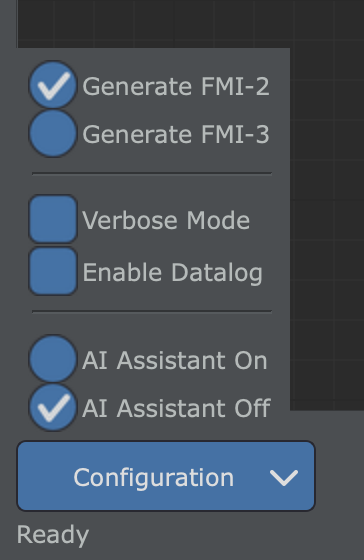
The server listens locally using the Streamable HTTP transport on:
The port can be overridden with the FMUCONTAINER_MCP_PORT environment variable. The server is bound to 127.0.0.1 only.
Once the server really listens, the log window shows AI Assistant enabled — connect your MCP client to http://127.0.0.1:8765/mcp. If it cannot start (port already taken, for instance), an error is shown instead and the menu switches back to AI Assistant Off.
Tuning the timeout
Each tool waits for the GUI to apply its operation before answering (this concerns the GUI flavour only — the standalone server has no window to wait for). That budget defaults to 60 s and can be changed with FMUCONTAINER_MCP_TIMEOUT (a number of seconds):
Building a container may be slower than editing one, so import_assembly, save_assembly and save_as_fmu get ten times that budget automatically — there is no second variable to set.
A timeout means the window did not answer, usually because a dialog is waiting for you; it does not mean the operation failed. Check the window before retrying.
Select AI Assistant Off (or close the window) to stop the server.
Connecting a client that launches the server
This is the standalone flavour: the client spawns fmutool-mcp itself, so there is nothing to start beforehand.
Claude Desktop — add to claude_desktop_config.json (~/Library/Application Support/Claude/ on macOS, %APPDATA%\Claude\ on Windows):
{
  "mcpServers": {
    "fmutool": {
      "command": "fmutool-mcp",
      "args": ["--root", "/path/to/my/fmus"]
    }
  }
}
VS Code — in .vscode/mcp.json:
{
  "servers": {
    "fmutool": {
      "type": "stdio",
      "command": "fmutool-mcp",
      "args": ["--root", "${workspaceFolder}"]
    }
  }
}
The fmutool key is the name the client will show you; it is yours to choose, and does not have to match the name the server advertises.
If fmutool-mcp is not on the PATH of the client (a common case when the toolbox lives in a virtual environment), give the absolute path of the script, or use "command": "/path/to/venv/bin/python" with "args": ["-m", "fmu_manipulation_toolbox.cli.fmutool_mcp", ...].
Connecting GitHub Copilot to the GUI server
Copilot must be in Agent mode (MCP servers are not used in Ask mode), and the server must be started before Copilot connects.
JetBrains IDEs
Open the Copilot chat, switch to Agent mode, open the tools/settings menu and Edit MCP configuration (Settings → Languages & Frameworks → GitHub Copilot → Model Context Protocol), then add:
VS Code
Create .vscode/mcp.json at the root of your workspace:
Available tools
| Tool | Description |
|---|---|
list_fmus | List FMUs currently in the assembly |
list_fmu_ports | List the ports of an FMU on the canvas, with filters and paging |
inspect_fmu_file | Describe an .fmu file without adding it to the assembly |
inspect_ssp | Describe an .ssp file without importing it, or tell why it is refused (see Assembly files) |
import_assembly | Replace the assembly by the one of a .json, .csv or .ssp file (see Assembly files) |
add_fmu | Add an FMU file to the assembly; adding a file again adds another instance of it (model-1.fmu), whose name is returned |
remove_fmu | Remove an FMU and its wires |
add_links | Connect output ports to input ports, one link or several |
remove_link | Disconnect an explicit link |
expose_input / expose_output | Surface a port on the container boundary |
set_start_value / unset_start_value | Set, or drop, a start value / parameter |
set_container_options | Set step_size, mt, mt_threshold, profiling, auto_*, … |
get_assembly_json | Review the assembly; a large one comes one container, then one section, at a time |
analyze_assembly | Summarise the assembly, or lint it before building (see Analysing an assembly) |
save_assembly | Write the assembly description: JSON or SSP, by the extension of the file |
save_as_fmu | Build the container FMU (FMI-2 or FMI-3), reporting progress |
Single-FMU tools
These come from fmutool and the Checker. They read or rewrite one .fmu file and never touch the assembly:
| Tool | Description |
|---|---|
summarize_fmu | Identity, capabilities, platforms, embedded resources, port counts |
check_fmu | Conformity to the FMI standard: schema and semantic rules, plus any registered checker |
describe_port | Everything declared about one port (of a file, or of an FMU of the assembly): every attribute (min, max, nominal…), FMI-3 dimensions, declared type with the attributes the port inherits from it, aliases, terminals |
dump_ports_csv | Export every port to a CSV file, for bulk renaming |
rename_ports | Rename — or drop — ports, from a mapping ({"old": "new"}) or from that CSV |
apply_operation | Strip/merge a Bus. prefix, trim, or filter ports by regexp, restricted with causality, type and variability if needed |
The three that rewrite an FMU always produce a new file and leave the source untouched. They change the FMU interface, so anything already connected to the old port names will break.
check_fmu answers compliant: true only when the descriptor validates against the FMI schema and no checker reports an error (compliant_with gives the FMI version of the schema). To keep the answer small, the messages of the same rule are grouped, with their count and a few examples — 2500 variables without start value make one entry — and at most 50 groups are returned per list; error_count and warning_count give the totals and truncated tells whether groups were left out. The full report is printed by fmutool -input model.fmu -check.
An empty new name removes the port
In the mapping or the CSV given to rename_ports, an empty new name deletes that port. The tool reports the ports actually renamed and removed, and the names of the mapping the FMU does not have (unknown), so the assistant can tell you what actually happened.
Reading port listings
list_fmu_ports and inspect_fmu_file report every variable of the FMU — inputs, outputs, parameters and locals alike — each with its causality, variability, type, unit, start value and description. Attributes the FMU does not declare are left out, and descriptions are cut after 80 characters.
Industrial FMUs have thousands of variables, so the answer is bounded: 50 ports are returned per call by default, at most 200 with limit. Rather than paging blindly, narrow the request:
causality=["output"]before looking for something to wire,type=["Real"]orvariability=["tunable"]: on an FMI-3 FMU, an FMI-2 type selects its family (RealisFloat32andFloat64,Integerevery integer type), and a port that declares no variability has the default of the standard,name_pattern="^engine_"to search by name (a regular expression),offsetto fetch the next page whentruncatedistrue.
apply_operation takes the same causality, type and variability filters, so the listing previews exactly the ports an operation will touch.
The counts field always describes the whole FMU, whatever the filter, and total counts the ports matching the filter. Comparing returned with total tells the assistant whether it has seen everything.
Two resources are also exposed: guide://usage (how to drive the tool) and assembly://current (the current assembly as JSON).
Assembly files
An agent can start from an existing file, and save its work in another format:
inspect_ssplooks at an SSP file without importing it, and writes nothing next to it. It gives a summary per system, itswarnings, and withnodeandsectionthe details, paged asget_assembly_json. A file the container refuses is an answer, not an error:readableis false andreasonsays why.import_assemblyloads a.json,.csvor.sspfile and returns its summary and thewarningsof the reader. It replaces the assembly: on a non-empty one it is refused until called withreplace=True, which the agent is told to confirm with you. A file that cannot be imported leaves the assembly as it was. The FMUs of an SSP file are extracted in<file>.dir, next to it; those of a description must be allowed byFMUCONTAINER_MCP_ROOT, as foradd_fmu.save_assemblywrites the description in the format of the extension:.json, or.sspwith the FMUs embedded and the routing resolved (see SSP export), in SSP 2.0, or 1.0 withssp_version="1.0".
The standalone server keeps what the tools do not handle (names on the container, dropped ports, architecture wires, geometry, start and stop times), and refuses a file with sub-containers: look at it with inspect_ssp, or open it in the GUI, which imports it on the live canvas.
Reading the assembly
get_assembly_json returns the assembly in the format of a JSON description, the FMUs being designated by their name, as in the other tools (save_assembly still writes the complete file). A real assembly of a few hundred ports is over 100,000 characters, far more than a tool answer can carry, so the answer is bounded:
- a small assembly is returned whole;
- otherwise, one container at a time: the root by default, any other one with
node="sub.fmu"(its name). The answer gives its options, its FMUs, thecountsof its sections, and its sub-containers reduced to their name and counts; - when even one container is too large, its sections are left out and
truncatedistrue: read them withsection(input,output,link,startordrop), 50 entries per call by default, 200 at most withlimit, the next ones withoffset.
assembly://current follows the same rule, without the arguments.
Analysing an assembly
analyze_assembly reads the assembly without building it. Nested containers loaded in the Container Builder are analysed too.
mode="summary" (the default) describes the assembly, container by container: name, options (step_size, mt, auto_*...), FMUs, counts, and the exposed ports and the links grouped by FMU and name prefix — the part before the first ., or before the first _ (Sc_2_DV.speed → Sc_2_DV, SNR_time3 → SNR_) —, each group with its count and a few examples. The ports sharing their prefix with no other port are counted under ungrouped. At most 15 groups are listed per list, the largest first. When the whole tree does not fit, the sub-containers are only given with their name, options, FMUs and counts (reduced): ask for one with node="sub.fmu".
mode="lint" reports the known traps, grouped by rule like the report of check_fmu: error_count, warning_count, info_count, then one group per rule with what the rule means, its count and a few examples naming their container. node="sub.fmu" restricts it to one container.
| Rule | Severity | Meaning |
|---|---|---|
input-fed-twice | error | An input is fed more than once (links and/or exposed inputs) |
duplicate-output | error | Several ports exposed under one container output name |
invalid-input, invalid-output, invalid-link, invalid-drop, invalid-start | error | An entry refused by the container builder: unknown port, causality, type without conversion, malformed start value... |
auto-rules-error | error | An auto_* rule fails at build time, e.g. two outputs auto-exposed under one name |
nested-mt | warning | mt enabled on a container and on one of its ancestors |
mt-sequential | warning | mt and sequential both enabled |
step-ratio | info / warning | The step of a sub-container differs from the step of its container; a warning above a ratio of 10, or when the ratio is not an integer |
auto-off-nothing-exposed | warning | auto_input or auto_output off, and nothing of that kind exposed by the root container |
lossy-link | warning | A link converts its value with a possible loss of information |
link-unit | warning | Linked ports declare different units: the toolbox does not convert them |
dangling-input | warning | An input neither linked nor exposed, even by the auto_* rules, and without start value |
fan-out | info | One output, or one container input, feeds several inputs |
source-fmu | info | Nothing feeds an FMU: a scenario, a stub of constants... (only when auto_link and auto_input are off) |
auto-rules-partial, sub-container-unchecked, not-checked | info | What the lint could not check (see below) |
The errors are exactly what the container build refuses. The port-level rules are not re-implemented: the assembly is replayed, container by container, into the container builder without building it, so the lint cannot disagree with the build. This needs the FMU files: an FMU the server cannot read is reported as not-checked. On large FMUs, the lint takes a second or two.
A sub-container only exists once built. The entries that involve one (a link to a sub-container, a port it exposes) are therefore not checked against its ports (sub-container-unchecked), and the dry run of the auto_* rules does not see its ports (auto-rules-partial). The lint only reads the description of the assembly: it says nothing of the simulation results.
Local models
The tools also work with models run locally, e.g. Qwen, Llama or Mistral served by Ollama or LM Studio, provided their context window is large enough. The definitions of the tools alone take about 4,400 tokens, sent with every request, and every tool result stays in the conversation: a page of ports is about 2,000 tokens.
- Use a context of 16k tokens at least, 32k recommended. Local runtimes often start with a much smaller one: in Ollama, raise
num_ctx(e.g.PARAMETER num_ctx 32768in aModelfile, or theoptionsof the API request); in LM Studio, raise the Context Length of the model. - When the context is too small, the runtime silently drops the beginning of the conversation: the assistant forgets its tools or its instructions, calls tools that do not exist, or answers without using them. Increase the context, or start a new conversation.
- Keep the requests narrow: filter the port listings (
causality,name_pattern) rather than paging through a whole FMU, and start withanalyze_assemblyrather than reading a large assembly section by section.
Prompts and reference resources
The know-how travels with the server rather than with this repository, so it reaches any MCP client — not only the ones able to read a SKILL.md.
Four prompts describe a complete procedure. They appear in the client as slash-commands or ready-made conversations, and all their arguments are optional:
| Prompt | Use it when the user… |
|---|---|
build_container | …wants to combine, merge or package several FMUs |
diagnose_assembly | …reports a container that fails to build or misbehaves |
inspect_fmu | …asks what an FMU contains |
analyze_assembly | …asks what the loaded assembly contains and how it works |
Four fixed resources and one templated resource carry the reference material:
| Resource | Content |
|---|---|
guide://usage | The recommended workflow, end to end |
fmi://conventions | Causality, variability, types, units — and their traps |
container://options | Every container option, derived from the tool schema |
assembly://current | The current assembly, as JSON, bounded like get_assembly_json |
fmu://{name}/ports | The ports of one FMU of the assembly, as JSON |
container://options is generated from the very model that validates set_container_options, so the documented options can never drift away from the accepted ones.
Security
What the assistant can do
The tools act on your behalf: they read .fmu files, and they write .json, .csv and .fmu files wherever you allow them to. Two guard-rails are always on:
- the destination extension must match the tool (
.fmufor a container,.jsonfor a description,.csvfor a port dump); - an existing file is never replaced unless the caller passes
overwrite=True— which an assistant should confirm with you first.
Set FMUCONTAINER_MCP_ROOT (or --root DIR) to confine every read and write to one directory tree. This is the single most useful setting when an agent drives the server.
Transport
| Transport | Exposure |
|---|---|
| stdio | None. The client is the parent process; nothing else can connect. |
| HTTP | Bound to 127.0.0.1: remote machines cannot reach it, but every local process can. |
The HTTP port is therefore an unauthenticated file-system capability for any script, any other user of a shared workstation, and any web page able to issue a request to localhost. Require a token:
# Standalone server: print a freshly generated token
fmutool-mcp --transport http --token generate

# GUI assistant: same thing, through the environment
FMUCONTAINER_MCP_TOKEN=generate fmucontainer-gui
The token is written to the log (the log window of the Container Builder, or stderr for the standalone server); configure your client to send it:
{
  "servers": {
    "fmutool": {
      "type": "http",
      "url": "http://127.0.0.1:8765/mcp",
      "headers": { "Authorization": "Bearer <the-token>" }
    }
  }
}
A token of your own works too (--token my-long-shared-secret), as long as it is at least 16 characters: a short one only provides the illusion of protection, so it is rejected.
Without a token the server still starts — enabling the assistant must not require ceremony — but it says clearly in the log that the port is open.
Troubleshooting
The client cannot connect
First check, in the log window, that the server announced its address (see Starting the server from the GUI), and that the client is configured with that exact URL. Then test the server without the client:
curl -X POST http://127.0.0.1:8765/mcp \
  -H "Content-Type: application/json" \
  -H "Accept: application/json, text/event-stream" \
  -d '{"jsonrpc":"2.0","id":1,"method":"initialize","params":{"protocolVersion":"2025-06-18","capabilities":{},"clientInfo":{"name":"test","version":"1"}}}'
On Windows, use curl.exe in cmd, with double quotes around the JSON and its inner quotes escaped (\"). An answer starting with event: message means the server works: the problem is between the client and the server.
HTTP proxy of the IDE
An IDE configured with an HTTP proxy may route the requests of its MCP client through that proxy, including the requests to 127.0.0.1. The proxy cannot reach your local server: the client then reports errors such as fetch failed or SSE error: Non-200 status code (400), and the Container Builder log shows no tool call.
Exclude the local addresses from the proxy. In JetBrains IDEs: Settings → Appearance & Behavior → System Settings → HTTP Proxy, add localhost, 127.0.0.1 to No proxy for. Elsewhere, set the NO_PROXY environment variable to localhost,127.0.0.1 before starting the IDE.
localhost instead of 127.0.0.1
The server listens on the IPv4 address 127.0.0.1 only. Some clients, especially on Windows, resolve localhost to the IPv6 address ::1 first, where the server does not listen (and where another program may answer). Use http://127.0.0.1:8765/mcp in the client configuration.
Warnings in the console
These come from uvicorn, the HTTP server, when a client tries HTTP/2 or HTTPS first: the server only speaks plain HTTP/1.1 and the client falls back to it. They are harmless as long as the tools work.
Known limits
- No nested containers can be created. The tools add FMUs to a single, flat container. Use the Container Builder GUI or a hand-written JSON description for a hierarchy. A nested assembly loaded in the GUI can be read and analysed (
node); the standalone server only knows flat ones, andimport_assemblyrefuses the others there. - The lint does not see the ports of sub-containers: the entries that involve a sub-container are not checked against its ports, which only exist once built.
auto_linklinks cannot be removed one by one: they are derived when the container is built. Disable the option and wire explicitly.- Units are not converted. Linking
m/stokm/his accepted and gives wrong results; the assistant is told to check, but cannot enforce it.